1
2
3
4
5
6
7
8
9
10
11
12
13
14
15
16
17
18
19
20
21
22
23
24
25
26
27
28
29
30
31
32
33
34
35
36
37
38
39
40
41
42
43
44
45
46
47
48
49
50
51
52
53
54
55
56
57
58
59
60
61
62
63
64
65
66
67
68
69
70
71
72
73
74
75
76
77
78
79
80
81
82
83
84
85
86
87
88
89
90
91
92
93
94
95
96
97
98
99
100
101
102
103
104
105
106
107
108
109
110
111
112
113
114
115
116
117
118
119
120
121
122
123
124
125
126
127
128
129
130
131
132
133
134
135
136
137
138
139
140
141
142
143
144
145
146
147
148
149
150
151
152
153
154
155
156
157
158
159
160
161
162
163
164
165
166
167
168
169
170
171
172
173
174
175
176
177
178
179
180
181
182
183
184
185
186
187
188
189
190
191
192
193
194
195
196
197
198
199
200
201
202
203
204
205
206
207
208
209
210
211
212
213
214
215
216
217
218
219
220
221
222
223
|
var AndrewX = AndrewX || {};
AndrewX.TCBT = AndrewX.TCBT || {};
* @plugindesc v0.10 Display a translucent character sprite when the character is behind a tile.
* @author AndrewX
*
* @param Default Opacity Rate
* @desc The default opacity rate for high layer character sprites. (Default: 0.2)
* @default 0.2
*
* @param Opacity Percentage Variable ID
* @desc Set a variable ID to use that variable to control opacity rate. Use 0 if you do not need this feature. (Default: 0)
* The real opacity rate will be the value of that variable divide by 100.
* @default 0
*
* @param Enable by Default
* @desc Set to "false" if you do not want high layer sprite to be displayed by default. (Default: true)
* @default true
*
* @help
* ============================================================================
* Introduction and Instructions
* ============================================================================
*
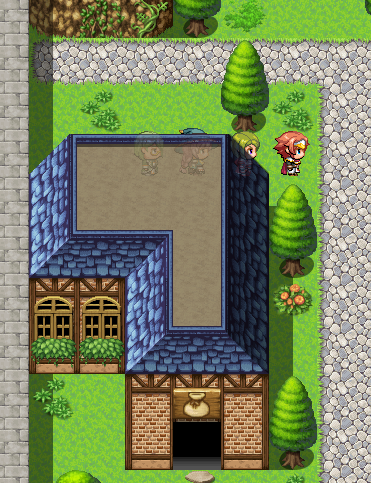
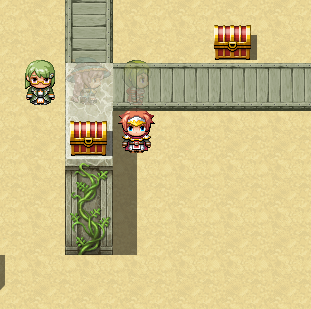
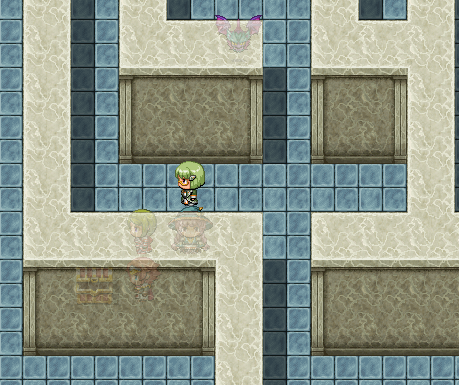
* This plugin will create high layer translucent sprites for characters
* (player, followers, events, vehicles), which are at the same layer as upper
* tiles (i.e. z = 4), so that when a character is covered by the tile, the
* high layer translucent sprite will indicate where he is.
*
* Usage:
* 1. Installed: Just enable the plugin in the Plugin Manager.
*
* 2. Setup parameters.
* a. Default Opacity Rate:
* The opacity for the high layer character sprites will be the product
* of the character's original opacity and the opacity rate you set in
* this plugin. This parameter is the default opacity rate.
* Valid value will be a number in range [0, 1].
* The default value for this parameter is 0.2.
* b. Opacity Percentage Variable ID:
* You can also use a variable to get dynamic control of the high layer
* sprites' opacity. This parameter takes in a variable ID in your game,
* and the opacity will be determined by the value of that variable.
* Note: As in RM, builtin variables only support integers. Thus, the
* valid value in the variable is a percentage number in range [0, 100].
* The actual opacity rate will be the variable's value divide by 100.
* If you use the variable to control opacity, the Default Opacity Rate
* will be ignored. Remember to adjust the variable you assigned to make
* the sprites to work.
* Use 0 if you do not need this feature.
* The default value for this parameter is 0.
* c. Enable by Default:
* Whether the high layer sprites should work by default. If you set to
* "false", no high layer character sprite will be displayed
* automatically. You need to enable them manually by plugin commands or
* event comment tags.
* The default value for this parameter is true.
*
* 3. Plugin Commands:
* Use plugin commands to modify high layer character sprite's visibility of
* an event temporarily:
*
* HighLayerCharacterSprite EventID true
* # Enable high layer sprite for the event
*
* HighLayerCharacterSprite EventID false
* # Disable high layer sprite for the event
*
* EventID = number for specific event
* EventID = 0 for "this" event
* EventID = -1 for player and followers
*
* 4. Event Comment Tags
* You can use event comment tags to set whether an event should display
* high layer character sprite by default.
* Event Comment Tags are set within comments in event contents of an event
* page. This will enable you to set different translucent sprite visibilities
* in different pages for the same event.
*
* <Enable High Layer Character Sprite>
* # Enable high layer sprite for this event
*
* <Disable High Layer Character Sprite>
* # Disable high layer sprite for this event
*
* To use these tags, in an event page, add Event Commands "Comment" in Flow
* Control, and write the tag.
*
* NOTE:
* 1. For events, the effect of plugin commands and event comment tags will
* last until the map is changed. For player and followers, the effect will
* remain.
* 2. Plugin commands and event comment tags can override each other.
* 3. Every time an event page is triggered, the event comment tag within
* this page will be evaluated. If there is no defined comment tag, the
* visibility of the high layer character sprite will not be changed.
*
* ============================================================================
* Changelog
* ============================================================================
*
* Version 0.10:
* - Finished prototype
*
* ============================================================================
* Term of Use
* ============================================================================
*
* Free for use in non-commercial or commercial RMMV projects
* Please credit AndrewX
*
*/
(function() {
var parameters = PluginManager.parameters('AndrewX_TranslucentCharacterBehindTile');
var defaultOpacityRate = Number(parameters['Default Opacity Rate'] || 0);
var opacityVariableId = Number(parameters['Opacity Percentage Variable ID'] || 0);
var enableByDefault = parameters['Enable by Default'];
AndrewX.TCBT.initMembers = Game_CharacterBase.prototype.initMembers;
Game_CharacterBase.prototype.initMembers = function() {
AndrewX.TCBT.initMembers.call(this);
if (enableByDefault.toUpperCase() === 'FALSE') {
this._showHighLayerCharaSprite = false;
} else {
this._showHighLayerCharaSprite = true;
}
};
AndrewX.TCBT.createCharacters = Spriteset_Map.prototype.createCharacters;
Spriteset_Map.prototype.createCharacters = function() {
AndrewX.TCBT.createCharacters.call(this);
this._highLayerCharaSprites = [];
$gameMap.events().forEach(function(event) {
this._highLayerCharaSprites.push(new Sprite_Character(event));
}, this);
$gameMap.vehicles().forEach(function(vehicle) {
this._highLayerCharaSprites.push(new Sprite_Character(vehicle));
}, this);
$gamePlayer.followers().reverseEach(function(follower) {
this._highLayerCharaSprites.push(new Sprite_Character(follower));
}, this);
this._highLayerCharaSprites.push(new Sprite_Character($gamePlayer));
for (var i = 0; i < this._highLayerCharaSprites.length; i++) {
this._tilemap.addChild(this._highLayerCharaSprites[i]);
}
};
AndrewX.TCBT.update = Spriteset_Map.prototype.update;
Spriteset_Map.prototype.update = function() {
AndrewX.TCBT.update.call(this);
var characters = this._characterSprites;
for (var i = 0; i < characters.length; i++) {
if (!this._highLayerCharaSprites[i]) {
continue;
}
this._highLayerCharaSprites[i].z = 4;
var opacityRate;
if (opacityVariableId >= 1) {
opacityRate = $gameVariables.value(opacityVariableId) / 100;
} else {
opacityRate = defaultOpacityRate;
}
this._highLayerCharaSprites[i].opacity = characters[i].opacity * opacityRate;
if (characters[i]._character._showHighLayerCharaSprite === true) {
this._highLayerCharaSprites[i].visible = characters[i].visible;
} else {
this._highLayerCharaSprites[i].visible = false;
}
}
};
AndrewX.TCBT.pluginCommand = Game_Interpreter.prototype.pluginCommand;
Game_Interpreter.prototype.pluginCommand = function(command, args) {
AndrewX.TCBT.pluginCommand.call(this, command, args);
if (command.toUpperCase() === 'HIGHLAYERCHARACTERSPRITE') {
if (eval(args[0]) < 0) {
if (args[1].toUpperCase() === 'TRUE') {
$gamePlayer._showHighLayerCharaSprite = true;
$gamePlayer.followers().reverseEach(function(follower) {
follower._showHighLayerCharaSprite = true;
}, this);
} else if (args[1].toUpperCase() === 'FALSE') {
$gamePlayer._showHighLayerCharaSprite = false;
$gamePlayer.followers().reverseEach(function(follower) {
follower._showHighLayerCharaSprite = false;
}, this);
}
} else {
subject = this.character(eval(args[0]));
if (args[1].toUpperCase() === 'TRUE') {
subject._showHighLayerCharaSprite = true;
} else if (args[1].toUpperCase() === 'FALSE') {
subject._showHighLayerCharaSprite = false;
}
}
}
};
AndrewX.TCBT.setupPage = Game_Event.prototype.setupPage;
Game_Event.prototype.setupPage = function() {
AndrewX.TCBT.setupPage.call(this, arguments);
if (this._pageIndex >= 0) {
for (var i = 0; i < this.list().length; i++) {
if ([108, 408].indexOf(this.list()[i]['code']) >= 0) {
var note = this.list()[i]['parameters'][0];
if (note.match(/<Disable High Layer Character Sprite>/i)) {
this._showHighLayerCharaSprite = false;
} else if (note.match(/<Enable High Layer Character Sprite>/i)) {
this._showHighLayerCharaSprite = true;
}
}
}
}
}
})();
|